Feed providers · Trunk Recorder
Trunk Recorder: send calls to ScoopMagnet.
About 5 minutes. Trunk Recorder ships with an Rdio Scanner uploader plugin; you point it at ScoopMagnet with your key. Your OpenMHz or Broadcastify uploads keep running alongside it.
Open your config.json
The file you start Trunk Recorder with, usually
config.jsonin its folder (with Docker, the one you mount into the container). Make a copy first:cp config.json config.json.bak.Add the ScoopMagnet block to "plugins"
Find the
"plugins": [ ... ]list (create it at the top level if you have none). Add this object to the list, with a comma between it and any plugin already there:{ "name": "rdioscanner_uploader", "library": "librdioscanner_uploader.so", "server": "https://scoopmagnet.com", "systems": [ { "shortName": "YOUR_SYSTEM_SHORTNAME", "apiKey": "YOUR_SCOOPMAGNET_KEY", "systemId": YOUR_SYSTEM_ID } ] }Replace the three placeholders:
YOUR_SYSTEM_SHORTNAME: theshortNameof the system in your own"systems"section (for exampleclmrnorbapern). Add one entry per system you want to send.YOUR_SCOOPMAGNET_KEY: your key, startingsm_.YOUR_SYSTEM_ID: your system ID number, no quotes.
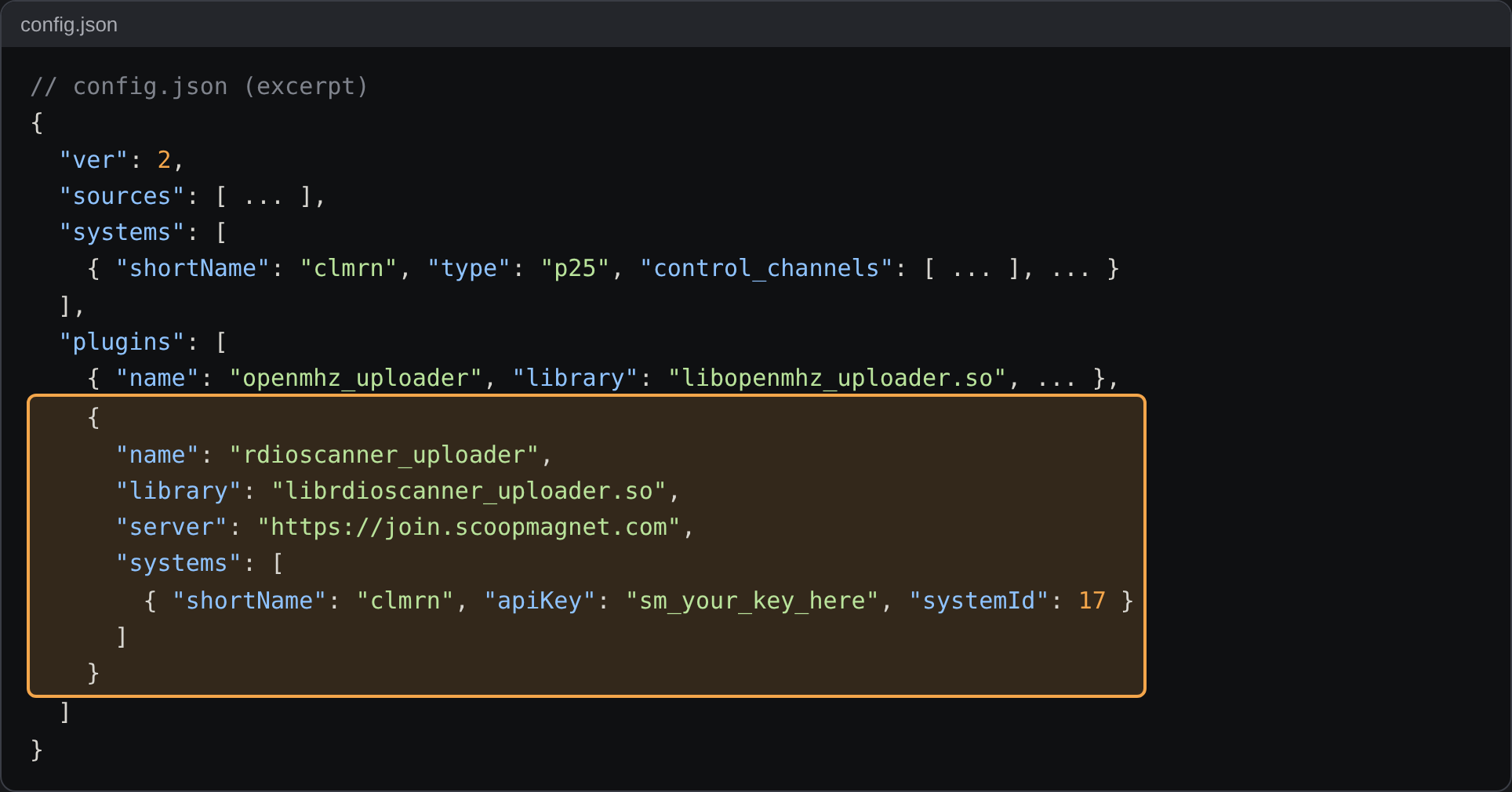
Where the block goes: inside the plugins list, next to any uploader you already run Want to send only some talkgroups? Add"talkgroupAllow": ["1001", "20*"]or"talkgroupDeny": [...]inside the system entry. Patterns take*and?.Check the JSON and restart
A missing comma stops Trunk Recorder from starting. Check the file first:
python3 -m json.tool config.json > /dev/null && echo OK. Then restart Trunk Recorder the way you normally do (docker compose restart,systemctl restart trunk-recorder, or stop and start it).Look for "Upload Success"
On start-up the log lists
Rdio Scanner API KeyandRdio Scanner System IDfor each system. After each call you should seerdioscanner_uploader Upload Success.
A healthy log: the uploader loaded, then Upload Success after each call Watch them arrive
Open your status page: last call, and a count by talkgroup.
If something's wrong
| Log says | Meaning and fix |
|---|---|
| Upload Error (HTTP 401) | Wrong key. Copy it again; no spaces, keep the quotes. |
| Upload Error (HTTP 403) | Your key is a teacher key, or paused. Write to us. |
| Upload Error (HTTP 417) | A call arrived without a talkgroup; harmless if it's rare. |
| No uploader lines at all | The block isn't inside "plugins", or shortName doesn't match a system. |
Questions: marc@lca.news.